Saturday, October 20, 2012

Small Living Room Design Solutions

We continue our series of posts on decorating small spaces. Here are some ideas for decorating a small living room. Design solutions for small spaces are not difficult to find. It is simply important to set priorities for the room, consider the budget and build the interior around those priorities and tastes.

Small Furniture Set

Opt for a small and cozy furniture that will save some space in the living room for pathways and other decorations. Also use space-conscious furniture with storage space to keep the room uncluttered. Many coffee tables come with a storage space under the tabletop.

Bright Colors

Don’t shy away from bright colors just because the living room is small just mix them with some light-reflecting neutrals. Learn how to use color in small spaces.

Eyes on Window

Accentuating the window can give the room a nice and bright focal point that will make it look a bit bigger. Also help reflect light with several mirrors located in the room.

Details and Accessories

Even if the living room is small it will look bland and boring without the accents, accessories and details. Personalized the place, decorate wall with portraits and framed pictures, use bright decorative vases, bowls, dishes and throw pillows as accents in the room. Add interesting, textured or creative lighting to the room. The light doesn’t have to be large but it can be interesting and detailed.


Sigma 20mm f/1.8 EX DG Lens Review

One of the best situations in which to consider a third party lens is when the camera body manufacturer does not have an equivalent offering. Meet the Sigma 20mm f/1.8 EX DG Lens - as of this writing, Canon does not offer a lens this wide with an aperture this large. The Sigma 20mm is over 1 stop faster than the fastest Canon 20mm prime or zoom lenses (f/2.8).
 Pictured above from left to right are the Canon EF 20mm f/2.8 USM Lens, Sigma 20mm F/1.8 EX DG Lens and Canon EF 16-35mm f/2.8 L USM Lens.

Unfortunately, I consider the Sigma 20mm f/1.8 EX DG Lens to be unusable at f/1.8 unless you are looking for a soft-focus effect. This lens is one of the softest I've seen wide open. Realistically, this will be an f/2.8 lens to most people as the center does not become decently sharp until this aperture. But wait - there goes the Sigma's uniqueness advantage for now there is a direct Canon counterpart, the Canon EF 20mm f/2.8 USM Lens that costs about the same price (price at times is another reason to buy third party lenses).

At f/2.8, the Sigma is sharper in the center than the Canon 20mm, but the Canon easily wins the corner competition even on a 1.6x FOVCF body at all apertures. My Sigma is worse on the right side than the left (the ISO 12233 chart mid and corner crops are from the right side), but the difference is not enough to merit much thought. Sigma's own MTF chart even indicates miserable performance outside the center. The corner problem seems to lie in the Sigma having a significantly curved plane of sharp focus - which I suppose no longer qualifies as a "plane". I am able to get reasonably sharp corners when the Sigma 20mm lens is stopped down, but the sharp areas are not close to the primary plane of sharp focus. At f/4, the Sigma 20mm f/1.8 EX DG Lens is sharp in the center and even sharper in the center at f/5.6. Below f/8, the corners are terrible.

Moving on - Vignetting. The first line in the first paragraph of Sigma's 20mm lens web page claims "This super-wide-angle lens is ensured minimal light-fall-off with superior peripheral brightness." I don't know what they are looking at, but the Sigma 20mm f/1.8 EX DG Lens turned in some of the strongest vignetting I've seen - 5 stops in the full frame corners at f/1.8. The not-so-funny thing is, the Canon 20mm Lens turned in similar results at f/2.8 and remains over a full f-stop behind the Sigma in vignetting performance as it is stopped down. Full frame users will want to stop this lens down to at least f/4 or f/5.6 to get more even results. Users of 1.6x FOVCF bodies will likely not notice much vignetting.

The Sigma 20mm f/1.8 EX DG Lens is very flare-prone - more so than the Canon 20 and much more so than the Canon EF 16-35mm f/2.8 L USM Lens. Keep the sun behind the large 82mm Sigma objective lens.

If you can get past the softness, vignetting and flare, the Sigma 20mm f/1.8 EX DG Lens actually produces decent image quality. Colors and contrast are good. Foreground/background blur quality are nice (9-blade aperture). Some CA (chromatic aberration) is visible at the wider apertures. Full frame body users will see mild barrel distortion. Exposures tend to average at least .25 stops brighter than typical Canon lenses.

The Sigma 20mm f/1.8 EX DG Lens internally focuses accurately and clearly lets you know that it is accomplishing this. The loud autofocus motor is not terribly slow, but the sound makes it seem much slower than it really is. Manual focus utilizes Sigma's not-so-brilliant Dual-Focus mechanism. The advantage to DF is that the focus ring does not turn during autofocus, but manual focus requires a switch change and a pull-back on the focus ring. The problem is that I am frequently changing the focus ring setting by accident when simply handling the camera/lens combination. Autofocus still works, but the focus rings turns in your hand - risking damage to the lens. Canon's USM (on Canon's 20mm lens) and Sigma's HSM are much nicer MF implementations. The manual focus ring is nicely sized - and smooth.


Above with their hoods in place are the Canon EF 20mm f/2.8 USM Lens, Sigma 20mm F/1.8 EX DG Lens and Canon EF 16-35mm f/2.8 L USM Lens.

The Sigma 20mm f/1.8 EX DG Lens is nicely sized and solidly built. At 3.5 x 3.5" (88.6mm x 89.5mm)(diameter x length) and 18.3 oz (520g), this lens is a joy to handle. The wide 82mm objective end is the reason for wide diameter measurement as most of the lens diameter is less than 3" (76mm). The large, abrupt change in lens diameter is not a nice comfort feature, but the small lens hood (included) mounts at this point anyway. The lens finish is the standard Sigma matte finish - I'm not fond of this, others like it a lot.

82mm filters are not cheap, but the non-rotating front element is a positive feature. Split Neutral Density and Circular Polarizer filter users will appreciate this. The Sigma 20 is probably best-suited for wide landscape photography where these filters (and narrow apertures) are commonly used.

I can think of a lot of other uses for a 20mm f/1.8 lens, but most of them require a sharp image at wide apertures. This would be a very-handholdable, action-stopping lens if it could be used at f/1.8. Of course, if you don't mind soft images, the look of a closeup 20mm f/1.8 picture is very artistic looking. With a short minimum focus distance of 7.9" (20cm), the Sigma 20mm lens yields a nice .25x maximum magnification. These specs coupled with the angle of view provided by a 20mm lens and the background blur of an f/1.8 aperture create very attractive images.

The Sigma 20mm f/1.8 EX DG Lens is available in Canon (reviewed), Nikon, Sigma, Minolta and Pentax mounts. My standard disclaimer: You should be aware that there are some potential issues with third party lenses. Since Sigma reverse engineers (vs. licenses) manufacturer AF routines, there is always the possibility that a new body might not support an older third party lens. There are examples of this happening in the past. Sometimes a lens can be rechipped to be made compatible, sometimes not. Second, there is the risk of a problem that results in the lens and body manufacturers pointing blame at each other. However, Sigma USA's 4-year warranty is far superior to Canon's standard 1 year warranty.

In conclusion, I recommend not buying the Sigma 20mm f/1.8 EX DG Lens. Sorry Sigma, this one is a dud. If you want a fast 20mm lens, I suggest saving for the Canon EF 16-35mm f/2.8 L USM Lens. It far surpasses the performance of the current Sigma and Canon 20mm lenses in all regards. If you want a good 20mm lens but do not need a fast aperture, the Canon EF 17-40mm f/4 L USM Lens is a great choice.

Canon EF 40mm f/2.8 STM Pancake Lens Review

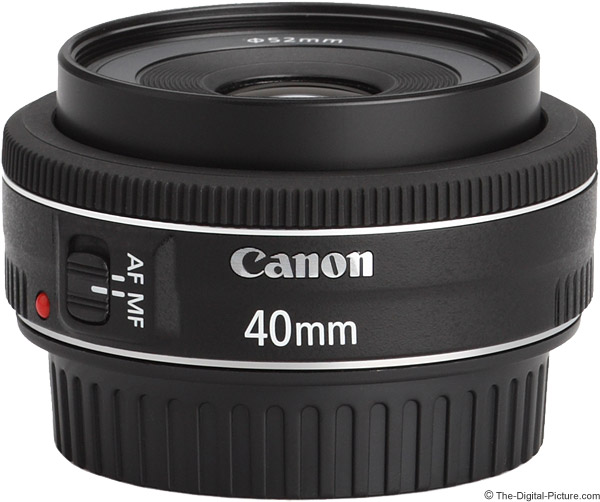
The diminutive Canon EF 40mm f/2.8 STM Pancake Lens immediately inspires the high-pitched talking-to-a-baby voice from its first-time viewers, with short drawn-out words and phrases such as "awwwwe" and "it's sooooo cuuute" being especially common. It is of course the size and weight of this lens that triggers this response.

The EF 40 STM enters the world tied with the Canon EF 50mm f/1.8 II Lens for the lightest Canon EOS lens designation. And, being just over half as long as the 50 f/1.8 II, easily shatters the length record. This lens is even shorter than a Canon 1.4x extender (comparison below)
 But the size of this lens is not the only reason to not take it seriously. The pancake's breakfast-level price ranks it near the bottom of all currently available Canon lenses. You could buy 70 of these for the price of one Canon EF 800mm f/5.6 L IS USM Lens. How many 40s would it take to consume the volume of one 800 L is a question I'm still pondering.

It is indeed hard to take such a tiny, inexpensive lens seriously, but don't write the EF 40 STM off too quickly.

 With new acronyms in the model name, let's start the Canon EF 40mm f/2.8 STM Pancake Lens review with some quick definitions. You know what "Canon" means. You know what "Lens" means. 40mm is of course the focal length of the lens. "EF" means that this lens will mount and function properly on all Canon EOS cameras produced to date. The new acronyms are "Pancake" and "STM". "Pancake", in lens speak, refers to a short, flat shape. "STM" stands for "Stepping Motor" - a motor that moves or rotates in small discrete steps (more info later in the review).
 With that understanding, let's move to an important lens decision factor - focal length. When choosing a lens, focal length should be one of your top selection priorities.

Falling between the wildly-popular 35mm and 50mm focal lengths, Canon's 40mm focal length choice is an interesting one. While a 40mm lens sounds close to a 50mm lens (and the two can often be used interchangeably), there is a difference in the perspective these lenses provide when identical framing is used.

In the example below, the sides of the frame are nearly identical for each example focal length, but the large trees in the background change size greatly in proportion to the foreground due to the different focus distances required for the same framing.

 These examples were shot with a full frame camera. The same lenses used on an APS-C camera would of course frame more narrowly (40mm frames like 64mm on APS-C), but perspective differences would still show in identically framed shots.

The wider angle lens will emphasize what is closer to the camera in relation to the background. The wider angle lens will also emphasize human subjects' closest parts - often noses - noticeably larger in relation to the rest of bodies if used at a close distance. 40mm is not a good head shot portrait lens.

Step back and your subjects will be happier with their portraits. Portraits (not framed tightly) are but one of a huge range of uses for a 40mm lens. 40mm is a focal length that you could leave mounted for general purpose needs.

A downside to using a single focal length for all of your images is that they can all begin to look similar. My preference is to use a range of prime lenses - in no more than 1/2 or 2x focal length increments.

Adding to its multipurpose capabilities is the relatively wide f/2.8 aperture. While not wide for a prime lens in this focal length, f/2.8 is as wide as zoom lenses get. An f/2.8 aperture is usually what I consider minimum for stopping motion indoors. Here is an outdoor motion-stopped example.

 The Canon EF 40mm f/2.8 STM Pancake Lens sample picture above was captured with the Canon EOS 5D Mark III. Settings were ISO 200, f/2.8, 1/1250, AI Servo AF, Burst Mode, 5300K white balance and the Standard Picture Style. A B+W 52mm XS-Pro Kaeseman Nano Circular Polarizer was utilized for this shot.

Not surprising with its small size is that the Canon EF 40mm f/2.8 STM Pancake Lens forgoes image stabilization. The relatively wide f/2.8 aperture makes this feature less missed. This lens is handholdable in lower light conditions.

 Small size and small price are great, but ... image quality is a sacrifice one would expect to make to gain these attributes. Amazingly, the Canon EF 40mm f/2.8 STM Pancake Lens delivers impressively in this regard.

The Canon EF 40mm f/2.8 STM Pancake Lens is very usably sharp at f/2.8 with a modest increase in softness as the outer portion of the image circle is reached. Stopping down to f/4 results in a sharp image across the frame save the extreme full frame corners. At f/5.6, even the extreme full frame corners are very sharp - allowing this lens to compete with lenses at far higher prices.

The ISO 12233 chart comparison tool will show you firsthand what these results look like - and will allow comparisons with the rest of Canon's lenses. Find this link at the top of the review.

At f/2.8, the EF 40 STM shows about 2 stops of vignetting in full frame corners. This is a noticeable amount, but not a severe or surprising amount. Half of the vignetting is gone at f/4, but .6 or .7 stops remain throughout the balance of the aperture range. As usual, APS-C users will not have to worry about vignetting from this full frame-compatible lens.

CA (Chromatic Aberration) is very well controlled - nearly absent. Same with flare. Even with the sun in the full frame corner, flare is hard to notice. Flare performance is certainly advantaged by the use of only 6 lenses in 4 groups.

The 40 STM has very minimal distortion.

Utilizing a circular 7 blade aperture, the 40 STM delivers a nice background blur quality as shown below.
A 40mm f/2.8 lens is not going to set any background blur records, but when used at f/2.8 and a short focus distance, the background goes nicely out of focus.


 The site's ISO 12233 chart tool is ideal for directly comparing lenses to each other, but I took a couple of inexpensive and relatively similar lenses outdoors on a clear day for another comparison with the 40 STM. You will likely recognize these images as being the bottom right crop from the perspective comparison shown near the beginning of the review.

Compared below are the Canon EF 35mm f/2.0 Lens, Canon EF 40mm f/2.8 STM Pancake Lens and Canon EF 50mm f/1.8 II Lens.

 Extreme full frame corner crops will show a lens at its worst.

The Canon EF 50mm f/1.8 II Lens is very well regarded for the image quality (sharpness) it delivers for its extreme low price. While it is a bargain, it is extremely low end in all other regards including build quality - which includes a plastic mount. My first 50mm f/1.8 II fell apart. It physically broke in half for no apparent reason.

The 50 f/1.8 II compared here was purchased specifically for this review. The replacement lens does not perform as well as my first one did - I do think it is an inferior copy. But, it sure makes the 40 STM look amazing. The build quality difference is also as night and day.

The Canon EF 35mm f/2.0 Lens is another inexpensive lens with an even closer-to-40mm focal length. This lens is sharp in the center of the frame, but does not have a flat plane of sharp focus - and corners are especially not rendered well.

The 50 f/1.8 II and 35 f/2 both have the wider aperture advantage. The difference between f/2 and f/2.8 is one stop - one stop is a 2x difference in the amount of light delivered to the sensor. If you don't need that extra stop, the 40 STM is, in my opinion, the best option of this group.

The Canon EF 40mm f/2.8 STM Pancake Lens is the first available Canon lens with the stepping motor AF implementation. The Canon EF-S 18-135mm f/3.5-5.6 IS STM Lens was simultaneously announced, but showed up in stock only as I put the finishing touches on this review.

While I definitely prefer Ring USM focusing systems better, the STM design works well. It focuses reasonably fast and most importantly, accurately.

The STM design is a focus-by-wire AF implementation. FTM (Full Time Manual) focusing is supported (if enabled for electronic manual focusing lens is selected in the camera's menu - the default), the focusing ring does not turn during AF. The lens' switch must be in the "MF" position - and the camera meter must be on/awake - for manual focusing. If the meter is inactive, MF does not function.

The focusing ring size, like that of the rest of the lens, is tiny. But due to the outer-most position on the lens barrel, the ring is still quite usable. It easy to rotate and reasonably smooth. Expect some modest subject size change in the frame when pulling focus on this lens. The front filter threads do not rotate with focusing, though the lens' inner barrel extends modestly at minimum focus distance.

There are no focus distance or DOF markings provided. There is no room for a window for such, and since the focusing ring is not directly connected to the focusing gears, printed markings are not available (as with USM AF implementations). Most AF lenses produced today have no significant DOF markings. I doubt that anyone using this lens will care about these missing features.

 The Canon EF 40mm f/2.8 STM Pancake Lens was introduce with the Canon EOS Rebel T4i / 650D DSLR. The T4i press release revealed that "When used with Canon’s new EF and EF-S STM lenses, the camera can provide smooth and quiet continuous AF while recording video." I don't doubt the "smooth" portion of that claim, but I'm more skeptical of the claim that the Rebel T4i will not capture focus motor sounds during video recording.

My T4i Kit did not ship as of Canon EF 40mm f/2.8 STM Pancake Lens review time, but I can tell you that the 40 STM is not a silent focusing lens. While not as noisy as the Canon EF 50mm f/1.8 II Lens for example, the 40 STM emits a buzz when focusing. The noise is not bad, but I do expect some buzzing motor noise to be picked up by an in-camera microphone even on the Rebel T4i/650D - unless a sound cancellation or other technology is employed.

In AI Servo mode, the 40 STM performs quite well. Honestly, I thought it would fall apart when given a reasonably challenging target. Of course, finding challengingly fast moving subjects that fill a 40mm frame (and do not impose a safety hazard to the photographer) is a bit of a challenge. The DOF at 40mm and f/2.8 is rather deep at the distances most often used for this purpose. My hit rate on the cantering/jumping horse shown above was quite high.

I much prefer the 40 STM's focusing system to the systems found in the Canon EF 35mm f/2.0 Lens and Canon EF 50mm f/1.8 II Lens.

The 40 STM's 11.8" (300mm) MFD (Minimum Focus Distance) will deliver a 0.18x MM (Maximum Magnification). This is a relatively low value, but a typical value for a prime lens. Here is how other Canon options compare:


Wide angle and normal focal length lens MFD/MM values typically change dramatically when used with extension tubes. The Canon EF 12mm Extension Tube II takes the MM value 0.50x and the Canon EF 25mm Extension Tube II takes the MM value 0.88x. The Canon EF 40mm f/2.8 STM Pancake Lens is not compatible with Canon's extenders. If you look at the comparison photo at the top of this page, you will see that it appears like the extender would protrude half way through the 40 STM.
 This is a bare bones lens - but it feels well made. The body is constructed of engineering plastic with a standard metal mount. The other external components include a single switch, and extending inner lens barrel and a tiny MF ring. The MF ring has very little play/wobble in its design.
 For many more comparisons, review the complete Canon EF 40mm f/2.8 STM Pancake Lens Specifications using the site's Lens Spec tool.

You will not have to worry about this pocket lens blocking your DSLR's built-in flash. Some of Canon's tiniest lenses are shown below.


 Positioned above from left to right are the following lenses:

Canon EF 40mm f/2.8 STM Pancake Lens

Unfortunately and as with most of Canon's non-L lenses, the Canon EF 40mm f/2.8 STM Pancake Lens does not ship with a lens hood included. I typically recommend using a lens hood most of the time, but not in this case.

 I fail to understand the purpose of the thread-on Canon ES-52 lenses hood (shown above). It is far too shallow to block any appreciable amounts of light - even from a far wider angle lens. And it is far too shallow to provide any appreciable protection from physical incidents. Perhaps I just need someone to set me straight on the purpose of the ES-52, but I think it is a complete waste of money and couldn't even bring myself to buy it for the product pictures

I'm not sure that this inexpensive lens justifies a protection filter, but the small 52mm filter size keeps the price low. Circular polarizer and ND/graduated ND filters are of course vey worthwhile to have - and again, 52mm filter are among the smallest and least expensive available.

No case is included in the Canon EF 40mm f/2.8 STM Pancake Lens box, but this baby lens could really use a cute little pink or light blue storage pouch. A LensCoat would also be cute.


 The Canon EF 40mm f/2.8 STM Pancake Lens is a member of the "Canon EF" family of lenses. This means that it is compatible with all Canon EOS cameras as of Canon EF 40mm f/2.8 STM Pancake Lens review time. Interesting is that Canon released an EOS 5D Mark III firmware update to improve functionality with the stepping motor in this lens. I'm not sure how this fixed issue relates to all previous EOS DSLRs.

 Overall, I’m finding very "little" to not like about this tiny, inexpensive lens. It is not hard to justify this purchase. Keep a pancake in your pocket - even for use as a backup lens.

Canon EOS 1Ds Mark II Digital SLR Camera Review

Sixteen point six megapixels of effective resolution is really nice. Of course, the Canon EOS 1Ds Mark II costs about the same per megapixel as the Canon EOS 1D Mark II - 2x as much money.

After spending a sum of money approaching 5 figures and waiting 3 months to get the Canon EOS 1Ds Mark II, I had high expectations. And I am not disappointed. I have found no unexpected surprises - do not expect to find any - and should not find any for what this tool costs.

The Canon EOS 1Ds Mark II's overall design, features (fully loaded including E-TTL II), functions, build quality, image quality (not resolution of course) ... are nearly identical to the Canon EOS 1D Mark II.

And for the most part, this is a good thing. Canon's 1-Series digital bodies are weather-resistant (when paired with a weather-resistant lens) and rugged. They are made to hold up to considerable and demanding use and in bad conditions. Though rugged, they have an attractive, modern design. Although some may disagree, I find the Canon 1-Series body very ergonomical. Although not light, the tactile feel and balance are excellent. The Canon EOS 1Ds Mark II feels great in my hand. I find that some setting changes are not as intuitive and logical as I would prefer, but I have definitely acclimated to the functionality.

Of high importance to most of us - the Canon EOS 1Ds Mark II focuses very fast and accurately (at least when I do my part correctly) using a 45-point autofocus system including 7 cross-type sensors. According to Canon, the 1Ds II focuses faster than its predecessor, the 1Ds, faster than the 1D and identical in speed to the 1D Mark II ... "Same One-Shot AF speed and AI SERVO AF subject tracking performance as the EOS-1D Mark II." (Canon) I personally have noticed no focus speed difference between the two mark II bodies. Canon also notes that "Because the AF unit is capable of operating at 8.5 frames-per-second and the Canon EOS 1Ds Mark II has a maximum speed of 4 fps, the AI Servo AF algorithm has been optimized for 4 fps operation."

Of highest importance is image quality - I am also not disappointed in any way in this regard. I didn't find anything sacrificed in image quality to get the large 16.6 megapixel image. The sensor and the related software deliver the excellent image quality I expect from Canon Digital SLRs. Dynamic range is very good (non-officially rated at 9.5 f-stops), colors look natural. Auto white balance is very good (I am using it more often than ever).

Canon EOS 1Ds Mark II sharpness is comparable to the Canon EOS 1D Mark II when the same number of pixels are covering the subject (pixel level sharpness). This is a good thing. Sharpness seems to be turned up slightly by default, but post-processing resulted in similarly sharp images even though the 1Ds II has a higher pixel density on the sensor. There was no question that the Canon EOS 1Ds Mark II delivered far more resolution for a similarly cropped image. And of course, if you reduce the 3:2 aspect ratio 4992x3328 pixel 1Ds II image to a 1D Mark equivalent 3504x2336 pixel image and apply some sharpening, the 1DS II image easily wins.

What can you use 16.6 megapixels of resolution for? Huge prints for one thing. Think Billboards! The Canon EOS 1Ds Mark II's image also has lots of cropping headroom. Even after cropping an image significantly, enough resolution can be available for a large print. Or take several crop variations out of a single shot. For those times 16.6 megapixels are not needed, JPEGs can be shot at 8.6, 6.3 and 4.2 megapixels. RAW files can be processed to any desired size when using DPP (Digital Photo Pro).

Although one can never have too much resolution (in my opinion), there are downsides to this - such as the resulting image file size. Canon EOS 1Ds Mark II .CR2 (raw) files average 13-16 MB (and like big, fast memory cards - a 2GB CF card formats to indicate 109 exposures available). High quality .JPG files are generally 5-8 MB, 16-bit .TIF files are 97 MB and 8-bit .TIF files are 48.7 MB. These numbers are about 2x larger than the same files from the Canon EOS 1D Mark II, which has about half as much resolution. Also averaging about 2x that of the 1D Mark II are the 1Ds Mark II's per image download (to PC) times (using a card reader) and the .CR2 processing times. I am not struggling with 16-bit image file load times or processing performance in Adobe Photoshop - I expected much worse.

Of significance is the Canon EOS 1Ds Mark II's 48.7 MB 8-bit .TIF file size. Getty Images and other of the world's premier stock photo agencies require a minimum 8-bit .TIF file size of 48 MB for their submissions. The Canon EOS 1Ds Mark II natively meets this requirement.

The Canon EOS 1Ds Mark II's FPS (frames per second) burst rate is slightly less than half that of the Canon EOS 1D Mark II (4 vs. 8.5). To hear the difference between 4 FPS and 8.5 FPS, select each of the following sound clips.


The 8.5 FPS specification of the 1D Mark II will be the deciding factor for many sports and other fast-action photographers. The 1Ds Mark II can shoot a burst of 32 JPEGs or 11 RAW frames before filling the buffer. The single frame shutter/mirror sound of the Canon EOS 1Ds Mark II also differs from the 1D Mark II - It is a bit more drawn-out.


Both cameras share the same 200,000 activation-rated shutter and the same 87ms viewfinder blackout time.

One of the Canon EOS 1Ds Mark II's most sought after features is the 1.0x full frame 36mm x 24mm sensor. The large viewfinder that comes with it is very nice. Wide angle lenses are very wide and very long lenses are required to fill the frame with small or distant subjects. But, the Canon EOS 1Ds Mark II stretches even the best lenses to their limits. Even some of the best lenses show vignetting and distortion with a wide open aperture at their shortest focal length. And, the shorter DOF (Depth of Field) for similarly-framed subjects (compared to a 1.3x or 1.6x FOVCF camera) can be good or bad. Read the Field of View Crop Factor Explanation for more information on this feature.

The Canon EOS 1Ds Mark II's higher pixel density (than the 1D Mark II) will be welcomed by those who crave more focal length or magnification. Although cropping may be required to get the framing right, more detail can be captured within the same framing and using the same focal length lens as the 1D Mark II. Higher pixel density often means more noise in the image, but the Canon EOS 1Ds Mark II handles this very well in my opinion.

 The above ISO noise sample 100% crops are from a neutral color block that typically shows ISO noise well. These samples were taken in bright sunlight. Because ISO noise tends to be higher in the blue channel, you might experience more ISO noise under red-colored lighting (incandescent for example). At the same time, you might notice less noise in less-neutral colored subjects.

 The above graphic above illustrates the ISO 1600 noise from the Canon EOS 1Ds Mark II (top) the Canon EOS 1D Mark II (bottom). Although it may not qualify for a "scientifically exact" comparison, it represents what I am seeing in side by side comparisons. These are 100% crops. Canon confirms that the two mark II bodies produce the "same low noise ..." If you don't need the full 16.6 megapixels of resolution for a specific high ISO image, you can reduce the size of the 1Ds Mark II image to reduce the noise appearance slightly. The bottom line - both DSLRs perform very well even at ISO 1600 - and any differences are insignificant to me.

 The above image is an intentionally and significantly overexposed 100% crop comparison from the Canon EOS 1Ds Mark II (left) and the 1D Mark II (right) to show how the 1D Mark II does not handle over-exposed red subjects well (becoming bright pink - not enough green, too much blue). The 1DS Mark II handles this situation more gracefully. In reality, I seldom saw the overexposed reds in my 1D Mark II shots, but its nice to know the problem is gone. Canon - How about a firmware update for the Canon EOS 1D Mark II?

As the same tripod-mounted lens was used for each of the above shots, the 1DS Mark II's higher pixel density I referred to above is also apparent. Do not use these clips to compare sharpness as this was the most dramatically differently colored section of the rose - not the focus point.

The Canon EOS 1Ds Mark II powers on nearly instantly (.3 seconds vs. .5 seconds for the 1D Mark II and .6 seconds for the 1Ds) and is very responsive (setting changes, menu navigation ...). Battery life is exceptional - plan on 1,200 or so shots from a fully charged Canon NP-E3 Battery Pack.

Like the 1D II, the 1Ds II uses both CF and SD memory cards, each in their own slot. Simultaneous recording to both cards is available for redundancy purposes. I found the 128MB SD card and 256MB CF card pictured in Canon's white paper (below) humorous - 12 and 24 exposure rolls of film come to my mind. :)

Because of their near-identical features and functions, many photographers will choose to have both the Canon EOS 1Ds Mark II and the 1D Mark II in their kit. There is basically no retraining or learning curve when switching bodies. After using the 1D Mark II for nearly a year, I could immediately use the 1Ds Mark II.

As I noted in my Canon EOS 1D Mark II Review, I found the very different landscape vs. portrait shutter release sensitivities very annoying. I also noted that Canon seems to have fixed that problem in later-produced 1D Mark II models. I am happy to report that the 2 shutter releases on my Canon EOS 1Ds Mark II have sensitivities that are identical to each other.

I'll leave you with 1 final Canon EOS 1Ds Mark II design change from the 1D Mark II - the "Ds" and "Mark II DIGITAL" nameplates are now gold plated. I doubt this change will help you get better images, but at least you can look good!


Picking up a new Digital SLR means a lot of work to me as I strive to find the best post-processing workflow. Maybe I'm just getting smarter, but Canon's DPP (Digital Photo Pro - included) is giving me better results than EVU (EOS Viewer Utility - also included). I found DPP to give me harsher looking results in the past, but EVU seems to be smoothing away some of the detail of the 1DS Mark II images. I've always liked the functionality of DPP better than EVU, but felt that EVU gave me the best end result. Regardless of how I got here, DPP is the RIC (Raw Image Converter) I am currently using for my Canon EOS 1Ds Mark II file processing.


The bottom line - The Canon EOS 1Ds Mark II has arguably the highest image quality of any currently available Digital SLR. Outstanding resolution from a rugged Digital SLR that feels great in my hand, the Canon EOS 1Ds Mark II delivers. I found not much to not like - other than the price - and the large file size required by the 16.6 megapixel images.

If 8 megapixels of resolution is enough for you and available lenses on a 1.3x FOVCF (Field of View Crop Factor) body are wide enough for you, the Canon EOS 1D Mark II is probably the right choice for you - I highly recommend it as well. And you can have two for the same price as a 1Ds Mark II.

If you can spare the high frame rate and the cash, the Canon EOS 1Ds Mark II will give you excellent high resolution images (if you do your part of course). I highly recommend it.

If you are not sure which Mark II is for you, the white paper link in the "More Canon EOS 1Ds Mark II Reviews" section below has some great information in it (dial-up users be warned - it is a large file).

Canon EOS 300D Digital Rebel SLR Camera Review

Since the Canon EOS 350D Digital Rebel XT Digital SLR has been introduced, the price for the Canon EOS 300D Digital Rebel has dropped significantly.

When Canon introduced the EOS 10D, we were impressed at how much camera was available for the price. Now Canon has introduced the Canon EOS 300D Digital Rebel - at a MUCH lower price. I couldn't resist taking a look at what may be the best digital SLR camera value going.

My review will primarily focus on comparing the Canon EOS 300D Digital Rebel to the Canon EOS 10D as that is what I am currently using - and what the Canon EOS 300D Digital Rebel most closely relates to.

The most obvious differences are the size, weight, price and color.

The Canon EOS 300D Digital Rebel is significantly smaller and lighter than the 10D. It seems (to me) to balance best with the lighter lenses. With the 18-55mm kit lens installed, this is a very small DSLR. One benefit is that it requires less effort to take with you. The downside to the weight issue is that the body is plastic. Plastic (vs. magnesium) results in a less rugged design and a cheaper feel.

I think everyone would agree that the Canon EOS 300D Digital Rebel wins in the price category - by a wide margin! The silver vs. black color issue is simply a personal preference - I prefer black.

A slightly less noticeable difference is the Canon EOS 300D Digital Rebel's lack of FEC (Flash Exposure Control). The 300D does not allow the built-in flash or the Canon 420EX Flash to be exposure compensated. The Canon 550EX has its own FEC control - but at a higher purchase price. The relatively large 550EX does not balance well on the light Digital Rebel. Also, because the Digital Rebel is missing a PC Synch Terminal, workarounds are required to use studio lighting.

The Canon EOS 300D Digital Rebel's built-in flash raises higher than the 10D's. This helps the flash fire over/above a greater list of EF lenses - fewer black half moons in your shots. Moving the flash farther from the camera usually results in less red-eye and generally better pictures.

The Canon EOS 300D Digital Rebel has an infra-red remote available for it. I prefer the infra-red remote to the standard tethered Canon RS-80N3 Remote Switch. It is much more convenient for me.

The Canon EOS 300D Digital Rebel's status LCD is located on the back - the Canon 10D's is on the top. I don't know which I prefer - they both work fine. The mode dial on the 300D is on the top right vs. top left for the 10D. I like the 10D's round back dial much better than the 300D's buttons.

The 1.6x field of view crop factor means that the outer 40% (approx) of a standard EF lens is not used. Starting with the Canon EOS 300D Digital Rebel, Canon is making an EF-S lens available. The EF-S lens basically omits the unsed portion of an EF lens - and is currently only compatible with the Digital Rebel.

The Canon EOS 300D Digital Rebel is missing some of the 10D's autofocus and exposure control in the creative modes. These (in my opinion) are some of the biggest disadvantages of the 300D. Also missing are the Canon 10D's custom functions.

The EOS 300D uses a pentamirror instead of a pentaprism. The advantage of a pentamirror is lighter weight and lower cost. The disadvantage is slightly more light loss in the viewfinder.

The Canon EOS 300D Digital Rebel's shutter is somewhat louder than the Canon 10D. Also, the Digital Rebel can shoot 2.5 frames per second for 4 frames in continuous shooting mode compared to the EOS 10D's 3 fps for 9 frames.

The Canon EOS 300D Digital Rebel's significant similarities to the Canon EOS 10D include the image sensor, the image processor and Canon EF lens compatibility.

The two cameras share some significant similarities.

You get the same incredible DiGiC processor handling the same incredible 6.3 megapixel image sensor. All other things being equal, the Canon EOS 300D Digital Rebel should yield the SAME great pictures as the Canon EOS 10D. Keep in mind that some of the default parameters such as sharpness are turned up higher on the 300D.

Canon is renowned for its lenses. The Canon EOS 300D Digital Rebel can take advantage of a huge selection of lenses from wide angle to extreme telephoto.

The Digital Rebel and 10D also share the same 1.8" LCD review display.

The 300D and 10D share the same 1.6x field of view crop factor. Wildlife photographers rejoice, landscape photographers keep waiting.

If you are looking for the basics in a DSLR - or your budget can only be stretched far enough for the Canon EOS 300D Digital Rebel - I highly recommend this camera. For those looking for more fine control over their photography, I recommend the Canon EOS 10D

Amazing Wood Casting Furniture by Hilla Shamia

Wood Casting is an amazing furniture line created by Hilla Shamia out of burned wood and aluminum. The tree logs and cast aluminum come in several different furniture pieces. The combination of wood and metal makes for a unique design and look. The traces of liquid metal is visible in the wood cracks while the metal and wood surfaces come in uneven patterns.

 The Wood Casting definitely catches the eye with its warm-cold texture. It would definitely fit the industrial or modern decor. The contrasting textures and materials create a certain dynamic in the decor. What do you think about Wood Casting furniture?

Chandeliers

avid D’Imperio chandeliers are as elegant as they are grand. D’Imperio‘s chandeliers are characterized by organic forms favored by designer and beautiful details. David D’Imperio chandeliers come in beautiful metallic shades of champagne, pearl white, wine-red, and blue. The shades have floral shapes which makes chandeliers look like flower vases hanging upside down with the florals reaching toward the ceiling or looking down to the floor. The Bluebird chandelier has a subtle bird shaped as the name suggests.


David D’Imperio chandeliers are beautiful with their elegant details and lacquered and metallic finish. The chandeliers can be used in traditional, modern and luxury decor. Grand lighting is a one way of making a nice focal point in the room while adding a touch of luxury to the decor.
Each of David D’Imperio chandeliers has its own style and name. Orchis chandeliers by David D’Imperio reminds of flowers by its shape and details, while Hydra features spiky crescent details. Stella comes with engraved aluminum arms and wine-red lacquered body, while Pearl Teadrop justifies its name by its drop-like form in beautiful pearl white finish.

Nokia reports £787m loss but shares rise

Nokia announced today that sales of its flagship Lumia range during its third quarter are down 19% from the same period last year. In real terms, the company shifted 2.9 million phones compared to 4 million in 2011.
The latest figures make for disappointing reading, especially considering Nokia was the biggest manufacturer of phones in the world for more than a decade. But the Finnish firm continues to lag behind the likes of Apple and Samsung in the innovation (and marketing) department.
But hold on just a second, there could be light at the end of the tunnel. Shares in Nokia increased in value by 9 percent following the announcement thanks to better-than-expected results and a licensing agreement struck with Amazon.
Nokia and Amazon agreed a deal in back August to bring Nokia Maps exclusively to the Kindle family of tablets.
Part of the reason for Nokia's ropey financial performance this year is the announcement that Microsoft would not update existing WP7 Lumias to Windows Phone 8.
Nokia chief Stephen Elop stated the slow down in the second half of the quarter was due to users holding out for the WP8-toting Lumia 920 and 820 handsets arriving from early November.
The Finnish company continues to ship feature phones and posted Q3 sales of 76.6 million units - up four per cent quarter-on-quarter. But again - that total is still down 15 percent year-on-year.
Back in smartphone land, Microsoft is due to announce Windows Phone 8 on October 29th where they are expected to openly demonstrate the new Nokia Lumia smartphones amongst their other device manufacturers.